 SEIR
SEIRAbout this demo
SEIR (Sovereign Enterprise Information Retrieval) lets people search across organizations while each organization keeps control of its own data.
The problem
Government agencies often need records held by other agencies. Today those requests travel as official letters or point-to-point service calls. Both are slow, and both work only when the person asking already knows which agency holds the record. Copying everything into one central search engine makes search fast, but then the owning agency loses control of its data the moment the copy is made.
SEIR separates discovery from disclosure. A shared index tells a searcher where a record is. Whether they may see it, and how much of it, stays the owner's decision.
How it works
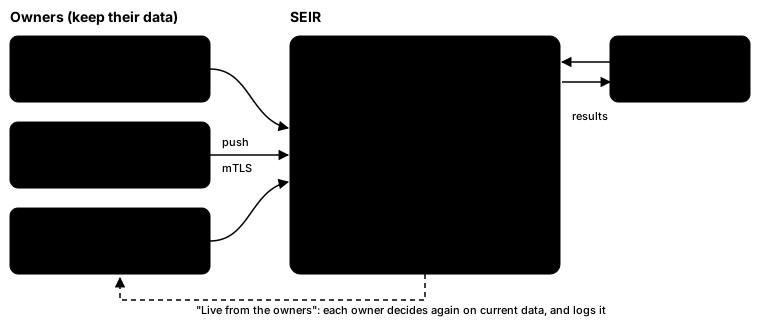
- Owners push. Each organization runs the SEIR Owner Agent next to its own database. The agent reads the organization's records and pushes them to SEIR over mutual TLS. SEIR never connects to an owner's database.
- SEIR indexes. An administrator registers each organization, its data structures and their fields. SEIR builds a search index from that registry. The organization chooses what goes into the index.
- Permission-filtered search. A searcher's token carries grants (which organizations they may search) and a clearance (the highest classification they may see). SEIR applies both before the search runs. Records outside them are never searched, so they don't even count in the total.
- Results resolved at the owner. With Live from the owners, SEIR asks each owner for the records, with the searcher's purpose. The owner decides again on its current data and its current policy, and logs the request. The owner never sees the search text.
Take the tour
Start without signing in and search a city such as Tehran (تهران): you find only the tax offices, the one structure its owner made public. Then sign in with a persona and search the same thing as each persona. A surname such as Karimi works well too.
- Tax auditor. You see taxpayers (up to secret) and the civil register's persons, but no vehicles: the tax auditor has no grant for the Vehicle Registration Office.
- Change permissions → Vehicle registrar. Same query. Now vehicles and persons appear, and the taxpayers are gone. Nothing was hidden after the search. The tax index was never searched.
- Change permissions → Identity-fraud investigator. All three organizations, up to confidential, and the investigator's own civil register up to secret. The totals change because records above the clearance never enter the search.
- Choose "Live from the owners" and enter a purpose code such as
fraud-check. Each owner now decides which records to return. Its answer and your purpose land in its own audit log.
What the demo shows
- The owner keeps control. Owners push only what they choose. SEIR can't change an owner's agent or its policy, and the live results come from the owner, not from SEIR's copy.
- Permissions are decided before the search. Grants pick the organizations, clearance picks the records inside them. Results are never filtered afterwards, so nothing leaks through counts.
- Classification. Every record carries a level: public, internal, confidential or secret. Each structure says which field holds it.
- Audit. SEIR keeps an append-only log of who searched, when and under which purpose (the search text only as a keyed fingerprint). Each owner keeps its own log of who asked for which records, and why.
- Generic search. One search API for every organization and structure. Adding an organization is a registry entry, not new code.
The organizations in this demo
Every organization is a separate owner with its own data, its own agent and its own rules. There are two kinds.
Synthetic government agencies, one per database. They show the governance features: classification, clearance, restricted records, live results from the owner.
| Organization | Kind | Data | On the demo |
|---|---|---|---|
| Civil Registration Organization (demo) | Synthetic | Registered persons | Now |
| Tax Administration (demo) | Synthetic | Taxpayers | Now |
| Vehicle Registration Office (demo) | Synthetic | Vehicle registrations | Now |
These three are fictional. Every name, number and record in them is generated. None of it belongs to a real person or a real agency.
Real websites, one organization per site. Each one is run separately, in different languages and with different kinds of content, and only shares what the site already shows its visitors. They show that organizations with different data can be searched together.
| Organization | Kind | Data | On the demo |
|---|---|---|---|
| onlineshop | Real | Products, categories, brands | Coming |
| Peyvand | Real | Posts, sources, themes | Coming |
| Digipich | Real | Standards, glossary | Coming |
| Minab war crime | Real | Published chapters | Coming |
| saeedshahsavan.com | Real | Blog posts and pages | Coming |
Real organizations hold public content only: never customer accounts, orders or anything else a visitor of the site can't already see.
Limits of this demo
This demo runs on one free cloud VM. It is not built like a production installation:
- Cloudflare terminates TLS for the demo's public traffic and can read it. That is acceptable for synthetic data. In production, SEIR would run on government infrastructure, under the government's own certificates.
- The owner agents run on the same VM as SEIR. In production each agent runs at its owner, inside the owner's network, next to the owner's database. Agent and SEIR still talk over mutual TLS here, as they would there.
- Personas stand in for an identity provider. In production an organization's own identity provider vouches for its people and their clearance.
- Small data, one machine: the demo shows the behaviour, not the performance.
How an organization joins
- Register. An administrator adds the organization and describes its data structures: the fields, which ones are searchable, and which field holds the classification.
- Install the agent. The organization runs the SEIR Owner Agent in its own network with its own configuration. It gets a client certificate and a token for its organization only.
- Push. The agent sends the records the organization chose, then the changes as they happen. Rejected records come back with reasons.
- Publish a data service (optional). For live results, the organization answers SEIR's requests itself, under its own policy and audit.
- Grant access. Other organizations' people get grants and clearances. Until then, nobody can search the new data.
The research
SEIR comes with the paper Owner-Controlled Data Access in Inter-Organizational Enterprise Search: Architecture and Evaluation (ICAEA 2026). It is under review. A link will follow here once it is public.
Contact
Questions about SEIR, or interested in a pilot? Write to [email protected].